
# Pricing and limits
Credit costs, quality variants, queue limits, seats, and Business wallet billing for Skybox AI. Live plan prices are always on the in-app plans page. This page explains features and limits. It is not a price list.
See current plan prices (opens new window) · FAQ
List prices are in US dollars. Stripe Adaptive Pricing can charge checkout in local currency. Enabled methods include cards, wallets, Pix, and regional bank debit; which ones appear depends on region. An issued invoice cannot be changed. Purchase orders are for Academic, multi-seat, and Enterprise agreements. Full list: What payment types do you accept?.
# Plans and seats
| Category | Plans | Who it is for |
|---|---|---|
| Free evaluation | Free | Try Skybox AI with limited features |
| Individual | Essential, Standard | Solo creators (priced per seat on plans (opens new window)) |
| Academic | Academic | Qualifying .ac / university / research institutions (self-serve monthly or 1-year) |
| Business | Business (and Enterprise via Contact sales) | Studios and teams building products with the API |
Free evaluation is not shown as a peer plan card on plans (opens new window). You can still try Skybox AI with limited features before you subscribe.
# Plan comparison
What each plan includes. For dollar amounts and checkout, use plans (opens new window). Prices on the screenshot can change.
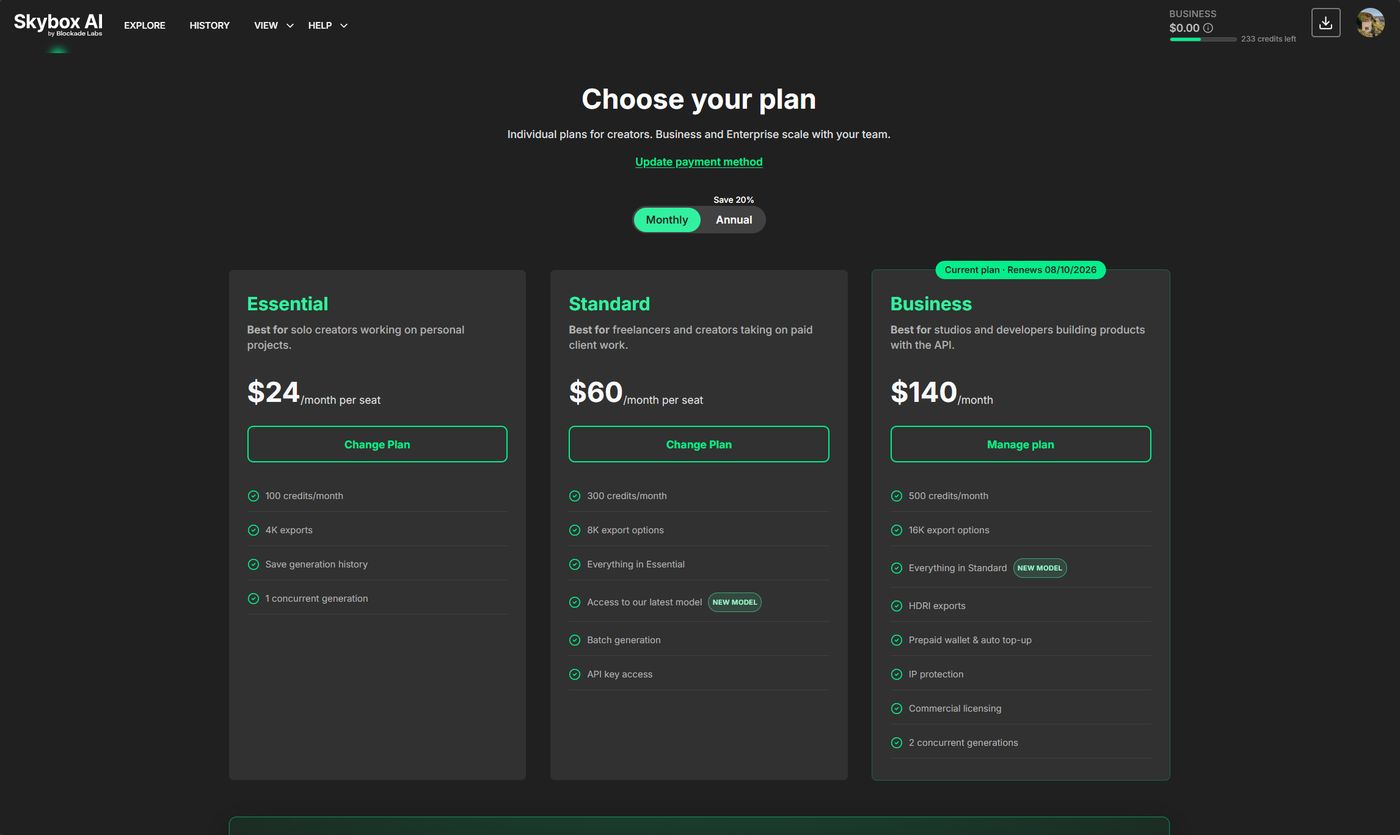
| Free evaluation | Essential | Standard | Business | Enterprise | |
|---|---|---|---|---|---|
| Best for | Trying Skybox AI | Solo / personal projects | Freelancers and client work | Products and studios using the API | Custom scale |
| Credits / month (monthly billing) | 5 | 100 | 300 | 500 included + wallet | Custom |
| Model 4 | No | No | Yes | Yes | Yes |
| API access | No | No | Yes (API key) | Yes | Yes |
| Batch generation | No | No | Yes | Yes | Custom |
| Max export | Preview only (no exports) | 4K | 8K | 16K + HDRI | Custom |
| Concurrent generations | 1 | 1 | 1 | 2 | Custom |
| Max pending generations | 1 | 3 | 3 | 30 | Custom |
| Max credits per batch | — | — | 3 | 30 | Custom |
| Wallet / scalable billing | — | — | — | Yes (prepaid + opt-in auto top-up) | Custom |
| Commercial license | No | Yes | Yes | Yes | Custom |
| IP protection (generations not used for training) | — | — | — | Yes | Custom |
| Data residency / non-US hosting | US only | US only | US only | US only | Custom (Enterprise) |
| Watermark | Yes (preview-oriented) | No | No | No | Custom |
Annual subscribers receive 12× the monthly credit allowance once at the start of the year (not a monthly refill). Those credits can be used at any point during that year. Example: Essential 1200/yr, Standard 3600/yr, Business 6000/yr.
Free evaluation is preview-oriented: limited credits, watermarked output, no Model 4, no API, no commercial license, no 3D export. See FAQ: Is Skybox AI free?.
# Seats today
A seat is a billed place for one Skybox AI user on a plan.
Accounts are non-transferable and single-member. One person uses one account, including on Business. The login, credits, API key, concurrency, and pending limits stay with that person.
# Seats coming next
Team accounts are planned. Members on Business will invite members onto one Business account (Organizations / seats). Each person still has their own login. Until that ships, each person uses their own account.
# Academic licenses
Academic is a self-serve plan for qualifying institutions (typically verified .ac email domains — for example .ac.uk — and similar university / research domains).
- Billing: fixed monthly or 1-year Academic subscription only (checkout on plans (opens new window))
- Verification: subscribe with your institutional email; personal consumer mailboxes are not accepted for Academic
- Features and credits: shown on the Academic card on plans (opens new window) (this page is not a price list and does not duplicate a separate Academic column until that matrix is locked in-app)
Purchase orders, multi-seat lab agreements, or non-standard domains: Contact sales (opens new window) or support@blockadelabs.com. FAQ: Do you offer academic licenses?.
# Quality
Create and Remix consume credits based on quality. Pass variant_id for Model 4 styles (from the variants array on Get Skybox Styles). Model 3 styles are always Fast and do not use variant_id.
| Quality | Variant ID | Model | Credits | Typical generation time |
|---|---|---|---|---|
| Fast | — | Model 3 | 1 | About 15 seconds |
| Standard | 1 | Model 4 | 3 | About 60 seconds |
| Enhanced | 2 | Model 4 | 6 | About 120 seconds |
Times vary with load and queue. For API max_wait guidance, see Generate Skybox. Prefer the id returned for your style if the API response differs from the table.
# Tool costs
| Tool | Credits | Notes |
|---|---|---|
| Create / Remix | 1 / 3 / 6 | By quality (Fast / Standard / Enhanced) above |
| Edit (Add / Remove) | 1 | Fixed per edit |
| Image2Pano | 3 | Fixed per conversion |
Web how-tos: Edit · Image2Pano.
# Scalable pricing
Business includes a monthly credit allowance plus prepaid wallet billing so your app can keep generating after included credits are used. Essential and Standard stop when included credits run out. Upgrade on plans (opens new window).
Billing is included credits, then wallet. There is no separate “overage” product name in the app.
# Wallet
The wallet is a prepaid dollar balance on Business. Credits are deducted in this order:
- Included plan credits
- Wallet
- Hard stop, or auto top-up if enabled
A $0 wallet while included credits remain is normal. Manage the wallet under in-app Credits. Every credit spent is listed on Usage (opens new window).
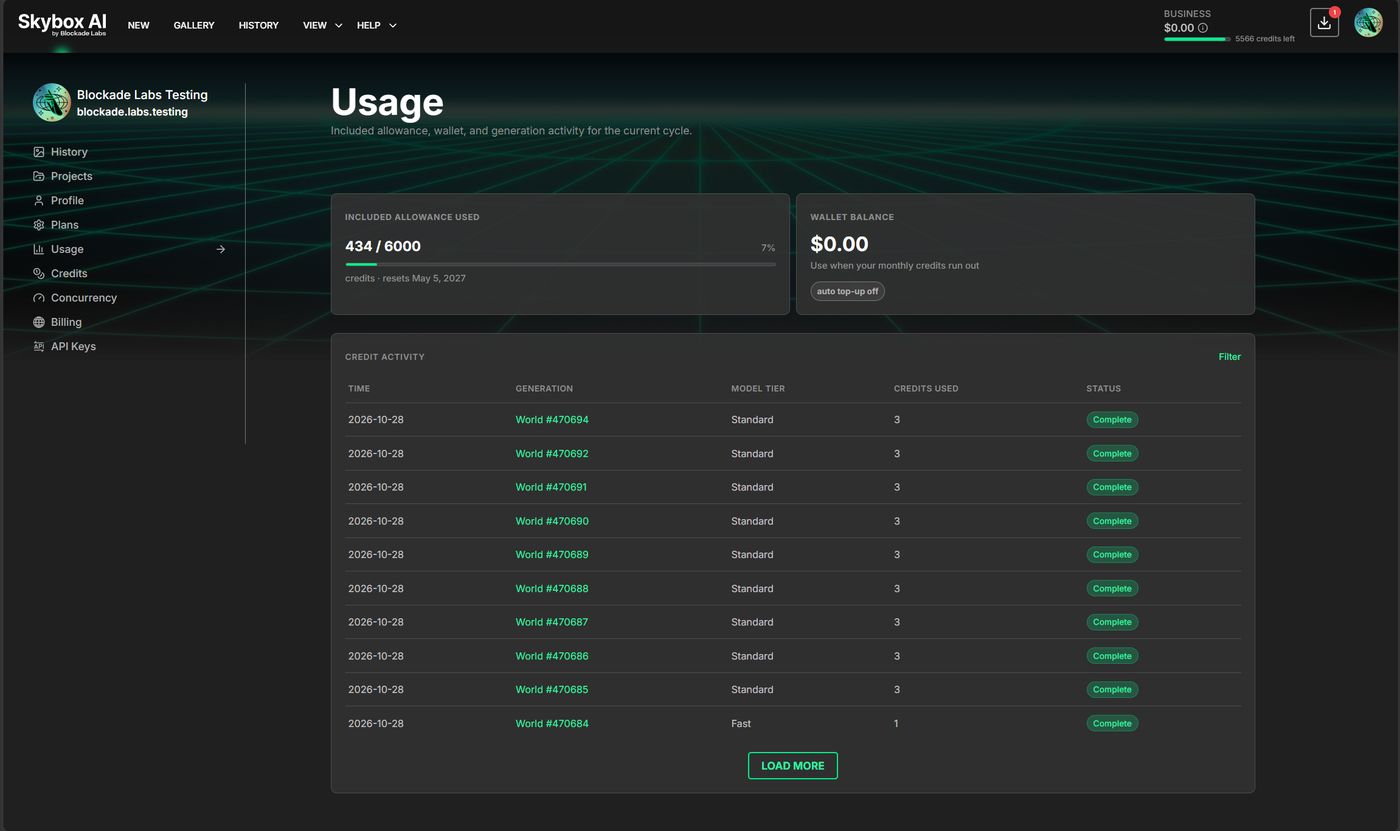
# Auto top-up
Auto top-up is opt-in and off by default on Business. On Credits, set Once balance hits and Add this much, then Enable auto top-up.
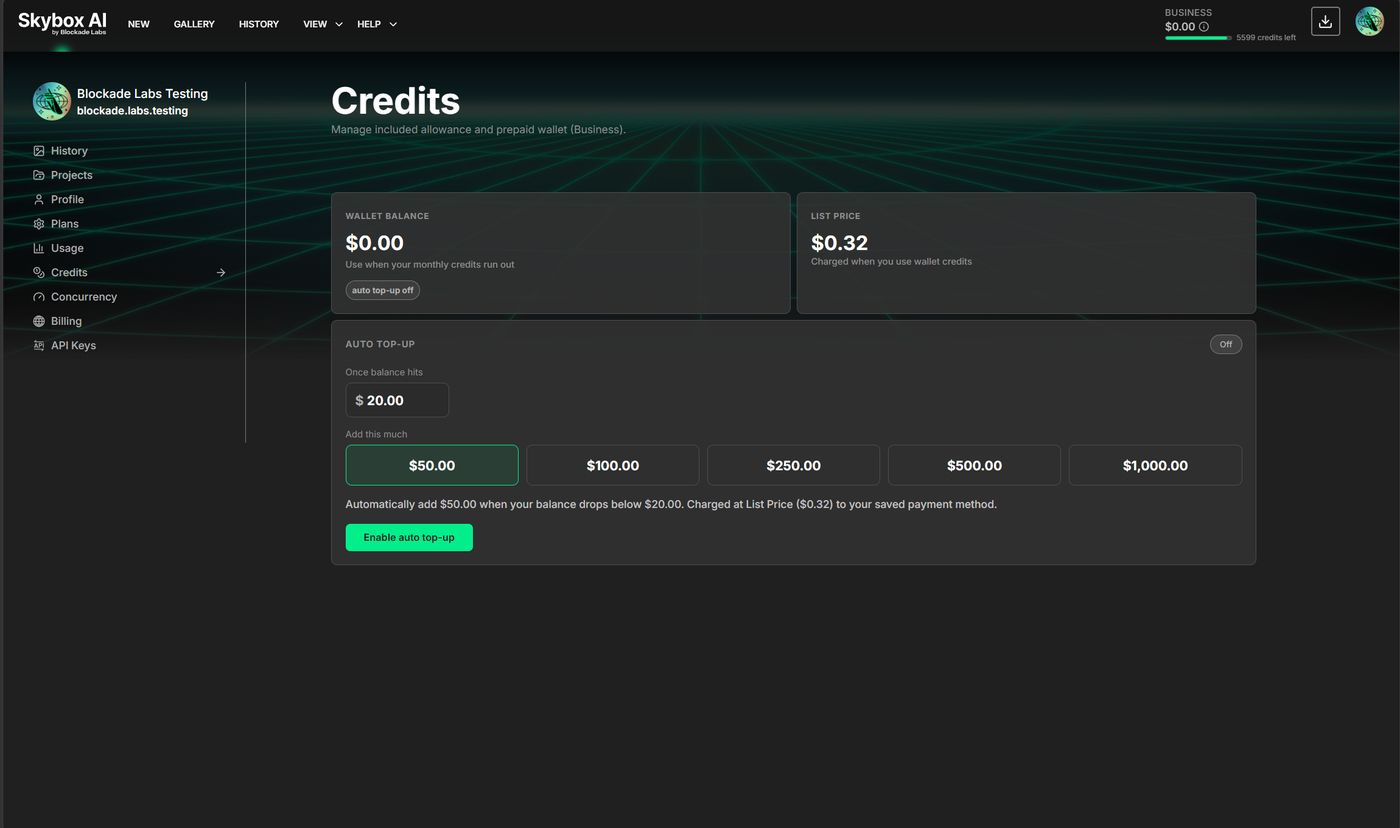
Amounts on that screen are an example. The live list price is on the Credits page.
Presets are $50, $100, $250, $500, and $1,000. The threshold stays below the amount you add. The page states the charge before you enable it: the chosen amount, when the balance drops below the threshold, at list price, on the saved payment method.
Enable auto top-up opens one confirm dialog. That dialog names the saved card, the amount, and the threshold. Confirm auto top-up turns it on. Cancel leaves it off.
A screen that only says auto top-up is off, then asks you to enable it before these settings appear, is not part of this flow. Removing that step is an improvement.
# List Price
Wallet deductions use List Price. The live amount is on the Credits page in the app:
List Price: {price}/credit
# Billing
Billing shows the current plan, the saved payment method, and invoices. Compare Plans and Cancel Plan are on the plan card. Edit Payment Info updates the card. Manage wallet on Credits opens Credits.
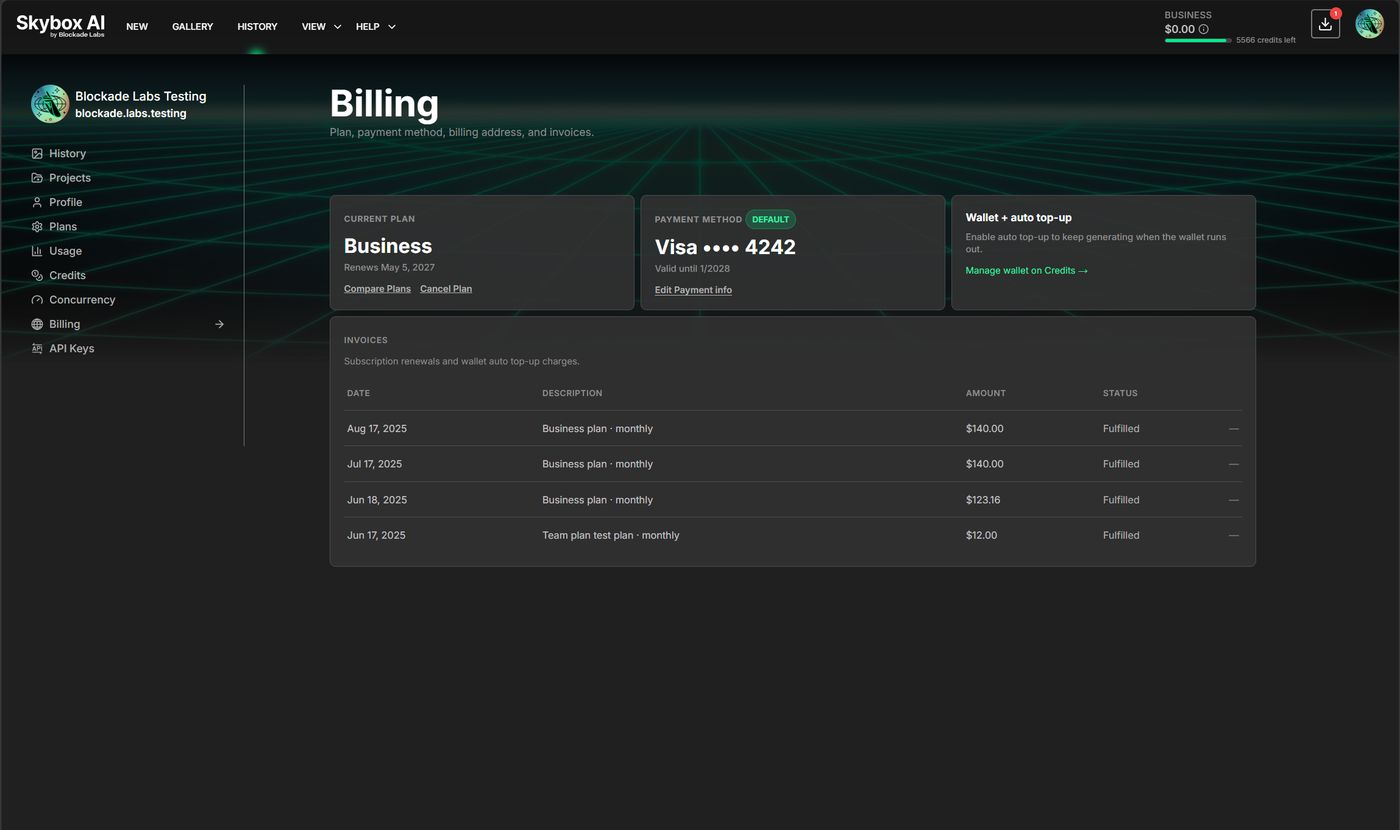
Invoices list the date, description, amount, and status. Amounts on that screen are an example.
# Pending generation limits
Each account can only have so many generations waiting or in progress (not yet complete, abort, or error) at once. Submitting another generation when that cap is full returns 429. See Errors.
| Plan | Max pending generations |
|---|---|
| Free evaluation | 1 |
| Essential | 3 |
| Standard | 3 |
| Business | 30 |
# Concurrency
Concurrency is how many of those pending generations can process at the same time. Extra requests still enter the pending queue (and count toward the pending cap) until a processing slot frees up. Queuing many requests in rapid succession does not raise concurrency.
| Plan | Concurrent generations |
|---|---|
| Free evaluation | 1 |
| Essential | 1 |
| Standard | 1 |
| Business | 2 |
Applications that need higher concurrency require Enterprise. Contact sales via the plans (opens new window) page (or Support).
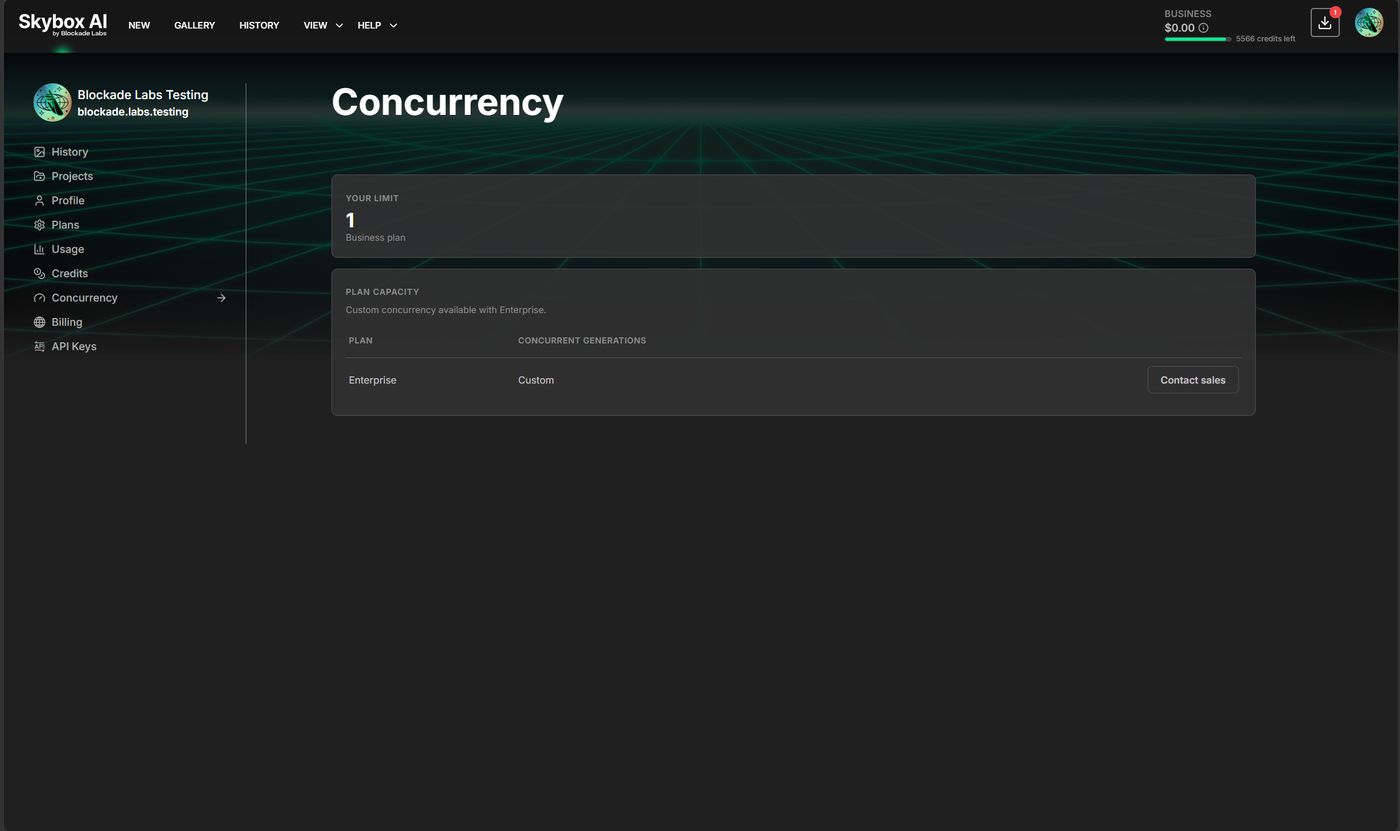
The Concurrency page shows Your limit for the signed-in plan. Plan capacity lists Enterprise as Custom, with Contact sales.
# How concurrency and pending limits work together
Limits apply per account (your API key / Skybox AI user), not per app install. Two game clients, a backend job, and the web app all share the same pool.
# Example: Business (2 concurrent, 30 pending)
- App A and App B each start a generation. Both begin processing (2 of 2 concurrency used).
- App C submits while A and B are still processing. That request is accepted and left in the queue (
pending/ waiting). It counts toward the pending total but does not process until a slot frees. - If more clients keep submitting until 30 generations are unfinished, the next
POSTreturns429. Wait for completions (or cancel pending work) before submitting again.
# Example: Essential or Standard (1 concurrent, 3 pending)
- One generation is processing.
- A second and third submit while the first is still running. Both sit in the queue (3 pending total: 1 processing + 2 waiting).
- A fourth submit hits the pending cap and returns
429, even though only one generation is actively processing.
# What to build for
- Treat concurrency as your parallel throughput ceiling; treat pending as your backlog ceiling.
- Prefer Pusher or webhooks over blind retries when you hit
429. - For multi-player or multi-tenant products, size the plan (or Enterprise) so peak simultaneous users × generations-in-flight stay under both limits.
# App generation limits
With great power comes great responsibility
Credits and queue limits are per Blockade account. The web app, your backend, and every person using that key share one pool. Those limits do not cap the bill. Put a limit in your own app before Generate is public.
- A 429 means the queue is full (Standard 3 unfinished, Business 30). When one finishes, the next request goes through and the credits are spent.
- Essential and Standard stop when the included credits are gone. Business then spends the wallet. With auto top-up on, Skybox AI refills that wallet and keeps charging.
- A larger batch, or Enhanced (6 credits), spends faster. A public Generate button with no limit of your own can run up a large bill.
Keep app guards lightweight and optional. A few constants plus one env flag is enough. Disable them (APP_GUARDS=off in the sample) when Generate is not public or you already cap spend. On a public Generate path, enforce limits before you call POST /api/v1/skybox: per-user / per-session / per-day, max batch, optional max quality, budget hard stop.
If the user needs an output in a given time, send max_wait (Fast 60s · Standard 120s · Enhanced 240s). Omit it if they can wait. Timed-out jobs error and credits are refunded. Errors